PCH19 <<
Previous Next >> AC Power
Overview
In this module on notebooks, we will discuss the various types of batteries used in notebook and laptop computers, along with battery construction, battery care, and various power level indicators. We will also discuss the variety of power sources a notebook has access to, including its battery, AC adapter, and docking stations. Next, we will discuss the proper disposal procedures that should be used when someone upgrades or breaks their notebook. Finally, we will discuss the physical security of notebooks. We will look at the construction of these devices, as well as the proper installation of the security cable and how it is connected to the notebook.
在筆記本電腦上的該模塊中,我們將討論筆記本電腦和筆記本電腦中使用的各種類型的電池,以及電池結構,電池維護和各種電量指示器。 我們還將討論筆記本電腦可以使用的各種電源,包括電池,AC適配器和擴展塢。 接下來,我們將討論當某人升級或損壞筆記本時應使用的正確處置程序。 最後,我們將討論筆記本的物理安全性。 我們將研究這些設備的結構,安全電纜的正確安裝以及如何將其連接到筆記本計算機。
Battery Types
Laptops and notebooks can receive power from several different types of batteries. The batteries are used to provide direct current (DC) to your notebook, and the batteries are then recharged by the alternating current (AC) adapter that connects your notebook to the wall outlet. The AC adapter actually works as a transformer, converting the wall outlet’s high-voltage AC into low-voltage DC that your notebook uses to charge its battery.
筆記本電腦和筆記本電腦可以通過幾種不同類型的電池供電。 電池用於向筆記本計算機提供直流(DC),然後通過將筆記本計算機連接至牆上插座的交流(AC)適配器為電池充電。 交流適配器實際上起著變壓器的作用,將壁裝電源插座的高壓AC轉換為筆記本計算機用來為電池充電的低壓DC。
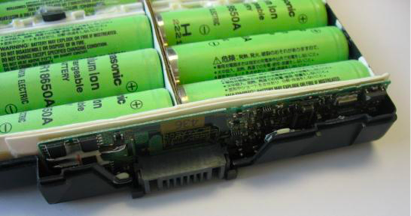
Battery cells. Photo used under CC-BY-SA license from Uwe Hermann.
The notebook battery is an enclosed plastic casing with individual battery cells on the inside, as shown in the images above. Older notebooks used either nickel-cadmium (NiCd or NiCad) or nickel-metal hydride (NiMH) batteries. These types of batteries are seldom used in modern notebooks and laptops because they suffered from what is termed the “memory effect.” Basically, the “memory effect” occurs when a battery loses its capacity to fully recharge if it is discharged repeatedly the same amount and then recharged without being fully drained first. For example, if every time your notebook battery’s charge was at 20 percent you went and recharged it, then 20 percent charge would become the new zero for your battery, reducing the overall charge available to only 80 percent of the original capacity.
筆記本電池是一個封閉的塑料外殼,內部裝有單個電池,如上圖所示。 較舊的筆記本電腦使用鎳鎘(NiCd或NiCad)或鎳氫(NiMH)電池。 這些類型的電池很少用於現代筆記本電腦和筆記本電腦,因為它們遭受了所謂的“記憶效應”。 基本上,“記憶效應”是指,如果電池反复放電相同量的電量而失去其完全充電的能力,然後在沒有完全耗盡的情況下進行充電,則會發生“記憶效應”。 例如,如果您每次筆記本電池的電量為20%時都要去充電,那麼20%的電量將成為電池的新零,從而將總可用電量減少到原始容量的80%。
Both of these battery types were replaced with lithium-ion batteries. The lithium-ion batteries do not suffer from the memory effect issue. They perform better than other types of batteries, and are lighter in weight, which increases a notebook’s mobility. Lithium-ion batteries also feature a rapid-charging option that allows faster charging when the user is in a hurry. These batteries are more environmentally friendly than the previous types, as well.
這兩種電池都被鋰離子電池取代。 鋰離子電池不會遭受記憶效應問題。 它們的性能比其他類型的電池更好,並且重量更輕,從而增加了筆記本的移動性。 鋰離子電池還具有快速充電選項,當用戶急忙時可以更快地充電。 這些電池也比以前的電池更環保。
To best care for your notebook or laptop, always use the approved battery type for your model. Using unapproved batteries in your notebook can lead to the notebook catching fire or exploding. In order to maintain notebook batteries at peak operating efficiency, keep the batteries at room temperature and avoid heat. If your notebook has a full charge and is subjected to high temperatures, the longevity of your battery will decrease. Batteries deteriorate over time, so purchase one with the most recent manufacturing date for the longest life. Also, getting a higher-capacity battery will provide a longer battery life on a given charge. Since lithium-ion batteries do not have a memory effect, it is often better to use partial-discharge cycles for notebooks and laptops that use those batteries. Note, while there is no memory effect, some lithium-ion batteries suffer from a “digital memory” that decreases the accuracy of the power gauge. To recalibrate the power gauge, you need to fully discharge the battery routinely, such as every few months, then completely recharge it. Lastly, if you are planning on storing your notebook for a while, it is best to discharge the battery to about 50 percent first, then store it in a cool, dry place. This will prolong the life of the battery and prevent you from having to waste money on a replacement.
為了最好地保護筆記本電腦或筆記本電腦,請始終為您的型號使用認可的電池類型。在筆記本計算機中使用未經許可的電池可能會導致筆記本計算機著火或爆炸。為了使筆記本電池保持最高工作效率,請將電池保持在室溫下並避免發熱。如果您的筆記本計算機充滿電並且處於高溫下,則電池的壽命會降低。電池會隨著時間的流逝而變質,因此請購買製造日期最近的電池以延長使用壽命。同樣,在給定的電量下,使用容量更大的電池將提供更長的電池壽命。由於鋰離子電池沒有記憶效應,因此對於使用這些電池的筆記本電腦和筆記本電腦,最好使用部分放電循環。請注意,雖然沒有記憶效應,但某些鋰離子電池會遭受“數字記憶”的困擾,這會降低功率計的精度。要重新校準功率計,您需要定期(例如每幾個月一次)對電池完全放電,然後將其完全充電。最後,如果您打算將筆記本電腦存放一段時間,則最好先將電池放電約50%,然後將其存放在陰涼乾燥的地方。這樣可以延長電池壽命,並避免您在更換電池時浪費金錢。
The amount of battery life is indicated in a number of ways in a notebook, depending on the computer model. All modern operating systems provide a digital gauge inside the operating system. This indication can be set by the user to show either the percentage of battery life remaining (such as 53 percent left), the time remaining until the battery runs out (such as 1 hour, 43 minutes to empty), or the time to full charge (such as 34 minutes to full charge). Some models of batteries, though, have a battery gauge included on the battery itself. This will use a scale, such as five circles that will light up to show the remaining life of the battery.
根據筆記本計算機的型號,筆記本電腦可以通過多種方式指示電池壽命。 所有現代操作系統都在操作系統內部提供數字量規。 用戶可以設置此指示以顯示剩餘電池壽命百分比(例如剩餘53%),直到電池用完的剩餘時間(例如1小時43分鐘用完)或充滿時間 充電(例如充滿電需要34分鐘)。 但是,某些型號的電池在電池本身中附帶一個電池電量計。 這將使用一個刻度,例如五個圓圈,它將點亮以顯示電池的剩餘壽命。
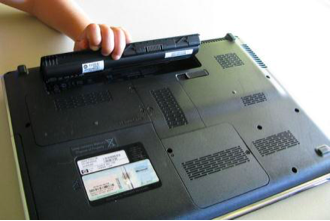
Laptop battery. Photo used under CC-BY-SA license from Intel Free Press.
PCH19 <<
Previous Next >> AC Power