PCH18 <<
Previous Next >> Troubleshooting Hard Drives
Laptop and Notebook Component Replacement
筆記型電腦及其零件更換
overview
In this module, we will discuss the types of hard drives used in laptop computers, as well as how to replace or upgrade them. We will also discuss the types of memory used in laptop and notebook computers, and the difference between upgrading laptop or notebook memory and upgrading memory in a standard desktop computer. Lastly, we will discuss the types of hard drive failure you may experience with a notebook computer and the best way to identify the failure and repair it properly.
在這個章節,我們將討論筆記本電腦中使用的硬盤驅動器類型,以及怎麼替換和升級他們。我們也將討論筆記型電腦(以下簡稱筆電)的記憶體種類,以及筆電和桌電(桌上型電腦)記憶體升級的不同。最後,我們將討論筆記本計算機可能遇到的硬盤驅動器故障類型,以及識別故障並正確修復的最佳方法。
Notebook Hard Drives
Laptop storage has evolved over the years from using traditional HDDs, which are very large and require a lot of power, to using smaller and smaller variants.
Similar to the desktop, older generation laptops used IDE/PATA, but current technology uses SATA connectors, or in the case of mSATA directly plugs into a port on the motherboard.
多年來,筆記本電腦存儲已經從使用非常大且需要大量電源的傳統HDD到使用越來越小的變體而發展。
與台式機類似,較早的筆記本電腦使用的是IDE / PATA,但當前的技術使用的是SATA連接器,或者在mSATA的情況下直接插入主板上的端口。
Whereas traditional desktop computers use a 3.5-inch HDD, laptops typically use a 2.5-inch hard drive. These drives contain capacity speeds comparable to their larger counterparts. Smaller notebooks might use an even smaller variant that is only 1.8 inches in diameter. These drives often operate at similar speeds to their larger counterparts, but may lack the same capacity for storage. These HDDs make use of a spinning disk with magnetic storage design.
傳統台式計算機使用3.5英寸HDD,而筆記本電腦通常使用2.5英寸硬盤。 這些驅動器的容量速度可與大型驅動器媲美。 較小的筆記本可能會使用直徑甚至只有1.8英寸的甚至更小的變體。 這些驅動器通常以與大型驅動器相似的速度運行,但可能缺少相同的存儲容量。 這些硬盤使用具有磁存儲設計的旋轉磁盤。
當前的筆記本電腦,尤其是上網本和其他需要更薄,更輕和更快存儲選項的筆記本電腦,使用的固態硬盤(SSD)遵循2.5、1.8或mSata尺寸規格。 最初,製造商開發了一種混合磁盤,該磁盤將內部磁盤與用於加速訪問時間的閃存形式結合在一起。 它們比傳統的HDD更快,並且當時的價格比完整的SSD便宜得多。
Current laptops, especially netbooks and other laptops that require thinner, lighter, and faster storage options, use solid-state disks (SSDs) following the 2.5, 1.8, or mSata form factor. Initially, manufacturers developed a hybrid disk combining an internal disk with a form of flash storage used to speed up access times. These were faster than traditional HDDs and much less expensive than a full SSD at the time.
當前的筆記本電腦,尤其是上網本和其他需要更薄,更輕和更快存儲選項的筆記本電腦,使用的固態硬盤(SSD)遵循2.5、1.8或mSata尺寸規格。 最初,製造商開發了一種混合磁盤,該磁盤將內部磁盤與用於加速訪問時間的閃存形式結合在一起。 它們比傳統的HDD更快,並且當時的價格比完整的SSD便宜得多。
SSDs contain no actual disk or moving parts. They are highly resistant to shock and movement, and have low latency and high access speeds. The performance of SSDs is far superior to traditional spinning hard disk drives, and they use less power than traditional hard disks, as well, which makes them ideal for mobile applications such as laptops and notebooks. HDD manufacturers have improved the design of SSDs, making them more resilient to I/O writes and reads and less susceptible to the failure first generation SSDs could suffer from if not configured correctly.
SSD不包含實際的磁盤或活動部件。 它們具有很高的抗衝擊和移動性,並具有低延遲和高訪問速度。 SSD的性能遠遠優於傳統的旋轉式硬盤驅動器,並且比傳統的硬盤耗電少,這使其成為筆記本電腦和筆記本電腦等移動應用程序的理想選擇。 HDD製造商改進了SSD的設計,使其對I / O寫入和讀取的彈性更大,並且如果配置不正確,第一代SSD可能遭受的故障也較不敏感。
In addition to traditional SATA or mSATA SSDs, many laptop manufacturers have chosen to incorporate embedded multi-media cards (eMMCs) in smaller 2-in-1 laptops, Chromebooks, or tablets that are designed with a detachable keyboard. eMMCs have faster access times than traditional HDDs, but are slower than an SSD. As the name implies, this storage device is an integrated circuit (IC) chip located on the motherboard. Currently, eMMCs most often come in either 16 GB, 32 GB or 64 GB capacity. Manufacturers most often include a micro secure digital (MicroSD) card reader and USB port to allow for external storage.
除了傳統的SATA或mSATA SSD之外,許多筆記本電腦製造商還選擇將嵌入式多媒體卡(eMMC)集成到較小的2合1筆記本電腦,Chromebook或配有可拆卸鍵盤的平板電腦中。 eMMC的訪問時間比傳統HDD快,但比SSD慢。 顧名思義,該存儲設備是位於主板上的集成電路(IC)芯片。 當前,eMMC最通常具有16 GB,32 GB或64 GB的容量。 製造商最經常使用的是微型安全數字(MicroSD)讀卡器和USB端口,用於外部存儲。
Laptop hard drives and SSDs are generally upgradable and replaceable, but the “internal storage” label for eMMC is not.
筆記本電腦硬盤和固態硬盤通常可以升級和更換,但是eMMC的“內部存儲”標籤卻不是。
With HDDs and SSDs being standard form factors (2.5-inch or 1.8-inch varieties), they can easily be removed and replaced with a larger capacity or higher speed version as long as the new drive matches in physical size and connection type (SATA or mSATA). To replace a hard drive, the technician simply removes the drive in accordance with the manufacturer’s instructions. It is always important to check with the laptop manufacturer’s instructions on the best way to remove the drive. Some models have a direct access area from the bottom of the laptop, while others require full disassembly of the machine, including the keyboard and casing.
HDD和SSD是標準尺寸(2.5英寸或1.8英寸),只要新驅動器的物理尺寸和連接類型(SATA或SATA)相匹配,就可以輕鬆地將它們卸下並替換為更大容量或更高速的版本。 mSATA)。 要更換硬盤驅動器,技術人員只需按照製造商的說明卸下驅動器。 請務必與筆記本電腦製造商的說明一起查看拆卸驅動器的最佳方法。 某些型號從筆記本電腦的底部可以直接進入,而其他型號則需要完全拆卸機器,包括鍵盤和機殼。
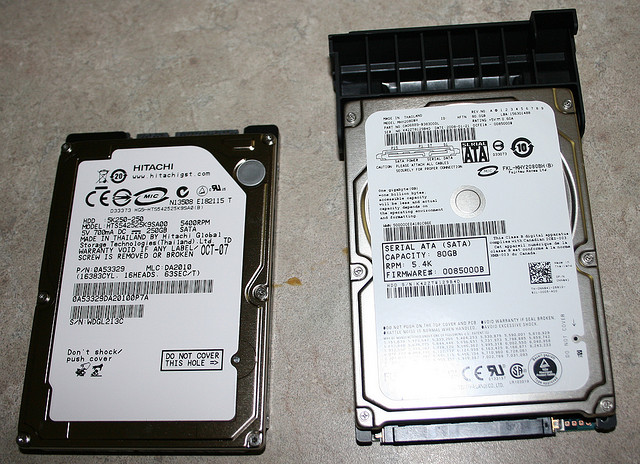
Laptop hard drives. Photo used under CC-BY license from Ray Dehler.
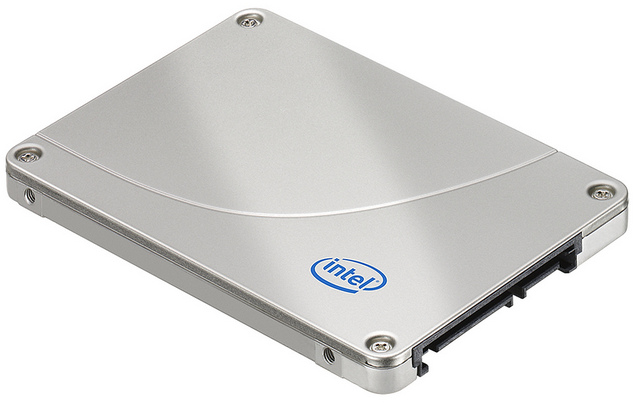
SSD. Photo used under CC-BY license from Intel.
Memory
Laptops use memory modules similar to their larger desktop counterparts. In desktops, DDR, DDR2, and DDR3 RAM modules are used to upgrade our systems, based upon the memory slots provided by the motherboard, and the speed and size accepted by the motherboard. Laptops, similarly, require the proper size and speed modules for their motherboards. Therefore, it is important to check the manufacturer’s manual for a laptop. Laptop memory also comes in DDR, DDR2, and DDR3 varieties, but laptops use the SODIMM (small outline dual in-line memory module) form factor. These are much smaller, more compact versions of the standard DDR, DDR2, and DDR3 modules, but they operate at the same speed and capacity as the larger versions.
筆記本電腦使用的內存模塊與大型台式機相似。 在台式機中,DDR,DDR2和DDR3 RAM模塊用於根據主板提供的內存插槽以及主板所接受的速度和大小來升級我們的系統。 類似地,筆記本電腦需要適合其主板的尺寸和速度模塊。 因此,請務必查看筆記本電腦的製造商手冊。 筆記本電腦內存還提供DDR,DDR2和DDR3多種類型,但筆記本電腦使用SODIMM(小尺寸雙列直插式內存模塊)尺寸。 這些是標準DDR,DDR2和DDR3模塊的更小,更緊湊的版本,但是它們以與較大版本相同的速度和容量運行。
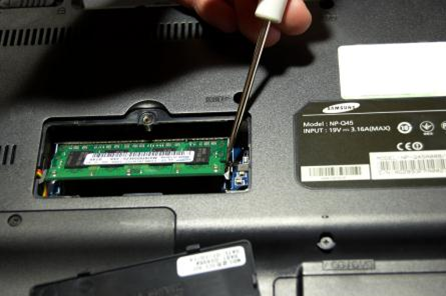
SODIMM in a laptop. Photo used under CC-BY-NC license from Ben Williams.
Replacing and upgrading memory is a fairly simply process, similar to replacing memory in a desktop machine. First, remove the power by shutting down the laptop, removing the power cord, and (if possible) removing the battery from the laptop. Next, replace the existing memory module, or add a second one, if applicable. Some laptops, like the one shown above, have a small plastic door covering the memory slots for easy access. Others may require full disassembly to access the memory slots. In a desktop computer, the modules are inserted at a straight-up-and-down vertical angle (90 degrees), but with laptops, the modules are inserted at a 45-degree angle first. Then the modules are pushed down into place once they are fully inserted into the memory slot. This is required due to the space limitations in the laptop.
更換和升級內存是一個相當簡單的過程,類似於在台式機中更換內存。 首先,請關閉筆記本電腦,拔下電源線,並(如果可能)從筆記本電腦中取出電池,以斷開電源。 接下來,更換現有的內存模塊,或添加第二個內存模塊(如果適用)。 某些筆記本電腦,如上圖所示,有一個小的塑料門蓋住內存插槽,以便於使用。 其他可能需要完全拆卸才能訪問內存插槽。 在台式計算機中,模塊以垂直向上和向下的垂直角度(90度)插入,但在筆記本電腦中,模塊首先以45度角插入。 將模塊完全插入內存插槽後,將其向下推入到位。 由於筆記本電腦的空間限制,這是必需的。
Some laptops have a single memory slot, while others have two slots. Some laptops may have their memory soldered onto the motherboard, making upgrading or removing the memory impossible. Always check your laptop’s manual for details on how many modules your laptop will accept (if any), how many gigabytes they can be, and the speed of the modules. For example, in the bottom image below, we see a 2 GB DDR2 memory module that operates at 6400 MBps, or 800 MHz.
一些筆記本電腦只有一個內存插槽,而其他筆記本電腦有兩個插槽。 一些筆記本電腦的內存可能焊接在主板上,因此無法升級或刪除內存。 請始終查看筆記本電腦的手冊,以獲取有關筆記本電腦可以容納多少個模塊(如果有),可以容納多少GB以及模塊速度的詳細信息。 例如,在下面的下圖中,我們看到一個2 GB DDR2內存模塊,其工作頻率為6400 MBps或800 MHz。
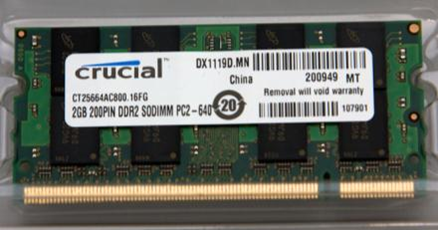
2 GB DDR2 memory module. Photo used under CC-BY-SA license from Cheon Fong Liew.
PCH18 <<
Previous Next >> Troubleshooting Hard Drives